Feedback with full context
Every comment carries the page, the exact element it is pinned to, its text and a screenshot. Your agent knows what to change and where.

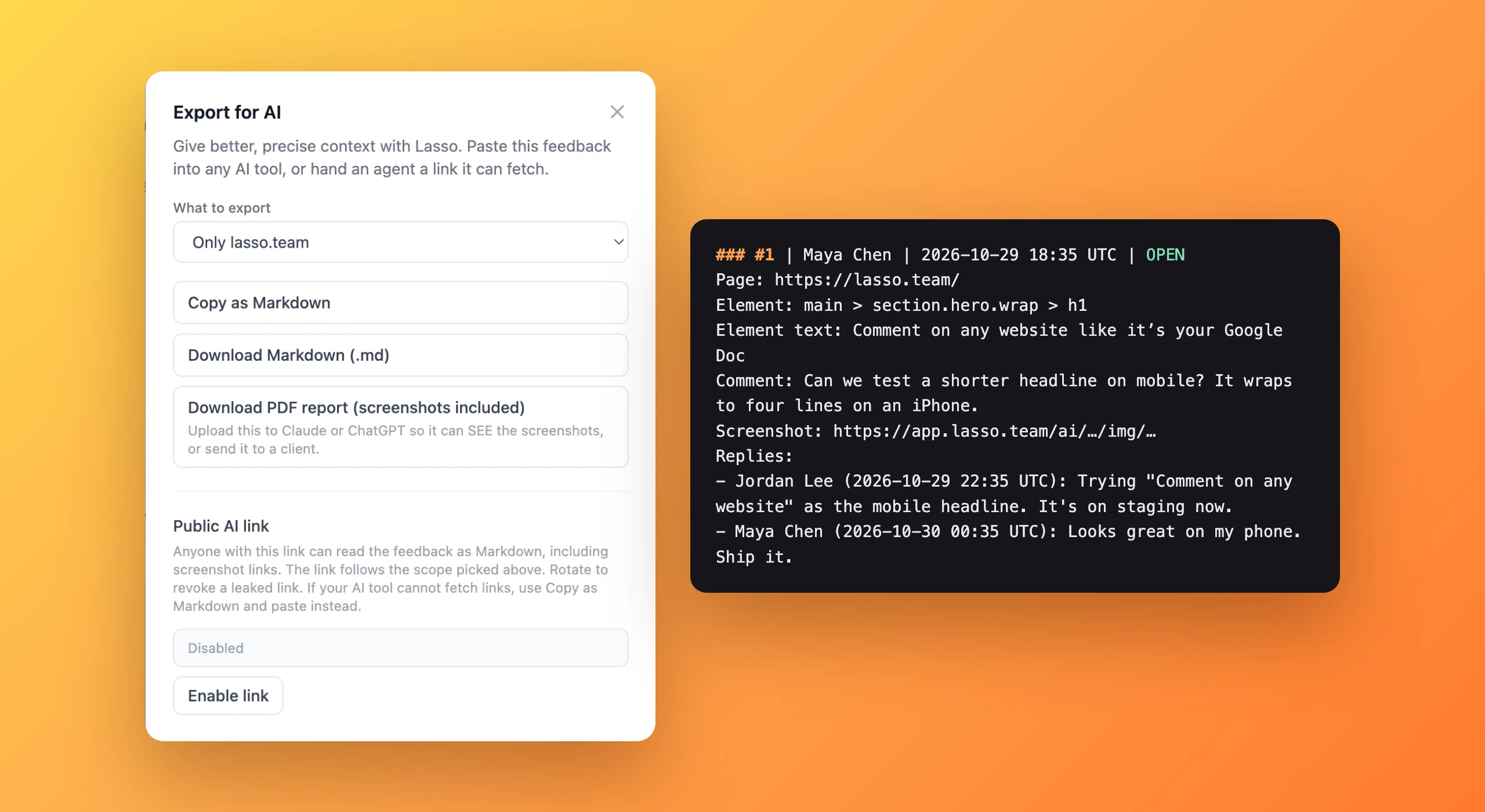
Export for AI
Lasso is the context layer between your website and your AI. Comment on the live page, then export it all as Markdown or a PDF with the page, the element and the screenshot for every note. Cursor and Claude Code fix what you pinned. ChatGPT and Claude turn your research into battlecards, positioning and copy.
Why it matters
Every comment carries the page, the exact element it is pinned to, its text and a screenshot. Your agent knows what to change and where.
Stop rewriting screenshots and Slack threads into prompts. One export holds every open comment and the discussion that settled it.
Your agent only sees what you export or share, and a private AI link stops working the moment you turn it off.
How it connects
Export a collection, or one site, as Markdown to paste into any agent, or as a PDF with every screenshot inside for chat tools that read images.
Turn on the AI link and any agent that can open a URL fetches the feedback directly, screenshots included. Rotate or switch it off anytime.
What your agent reads
### #1 | maya | 2026-10-30 14:12 UTC | OPEN
Page: https://staging.acme.com/pricing
Element: section.plans > div.plan-card:nth-child(2) > a.btn
Element text: Start free trial
Comment: Say "Start your 14-day trial" and use the primary button style.
Screenshot: https://app.lasso.team/ai/…/img/…
Replies:
- dev: Primary style is the orange gradient one in the hero.
Then tell it what to do. This prompt works well.
Work through every OPEN item in this Lasso export. Use the Element and Element text lines to find each element. Treat RESOLVED items as context only, follow the latest reply where it changes the request, and tell me anything you couldn't find.Not building? The same export works for research. Pin notes on competitor pages and ask ChatGPT or Claude for a battlecard. Here are the prompts we use.
Pin your feedback to the exact elements with Lasso, then use Export for AI. The agent gets each comment with its page URL, CSS selector, element text, screenshot and discussion, so it can find and fix the right thing.
A Lasso export lists every comment with its page, element selector, visible element text, the comment, a screenshot link, the replies and whether it is open or resolved. It starts with a short legend that tells the model how to read the file.
Yes. Turn on the private AI link for a collection and any agent that can read a URL can fetch the feedback as Markdown, with stable screenshot links. You can turn the link off or rotate it at any time.
Yes. Export for AI, including Markdown, PDF and the private AI link, is part of Lasso's free plan.
Any tool that accepts text, a PDF or a link. People use Lasso exports with Cursor, Claude Code, Codex, ChatGPT, Claude, Lovable and v0.
Pin a few comments, turn on the AI link, paste it into your agent and ask it to fix the open ones.
Export for AI is free on every plan · Read how teams use it