
Guides · How to
How to send website feedback to ChatGPT, Claude or Cursor
Pasting a URL into ChatGPT rarely gets you the fix you wanted. How to hand an AI your actual feedback, with the exact element and a screenshot, as a Markdown file or PDF, plus prompts that work for code fixes and for research.
Here's how most people give an AI feedback on a website. Paste the URL, then write a paragraph. "On the pricing page, the second card, the button under the price, make it say start your trial and use the orange style."
Sometimes it works. Often the AI reads a different version of the page, can't see anything behind your login, or edits the wrong button with total confidence and a lovely commit message.
The fix isn't a better prompt. It's better input.
What an AI actually needs
For each piece of feedback, an AI does best with the same things a developer would ask you for.
| What | Why it matters |
|---|---|
| The exact page URL | So it works on the right page, not the homepage |
| The element, as a CSS selector | So it can find it in the code or the page |
| The element's visible text | A backup when the selector has changed |
| A screenshot | So it sees what you saw, including state and layout |
| What you want | The actual request, in your words |
| Status and replies | So it skips things already fixed or overruled |
You could type all of that by hand for every note. Nobody does, at least not consistently, which is why AI fixes miss so often.
The quick way
- Comment on the pages. Install Lasso and click the exact elements you mean, typing what you want. Each note records the page, the selector, the element's text and a screenshot on its own.
- Let the team settle it. Teammates reply, disagree and resolve. By the time anything reaches the AI, the duplicates and the bad ideas are gone.
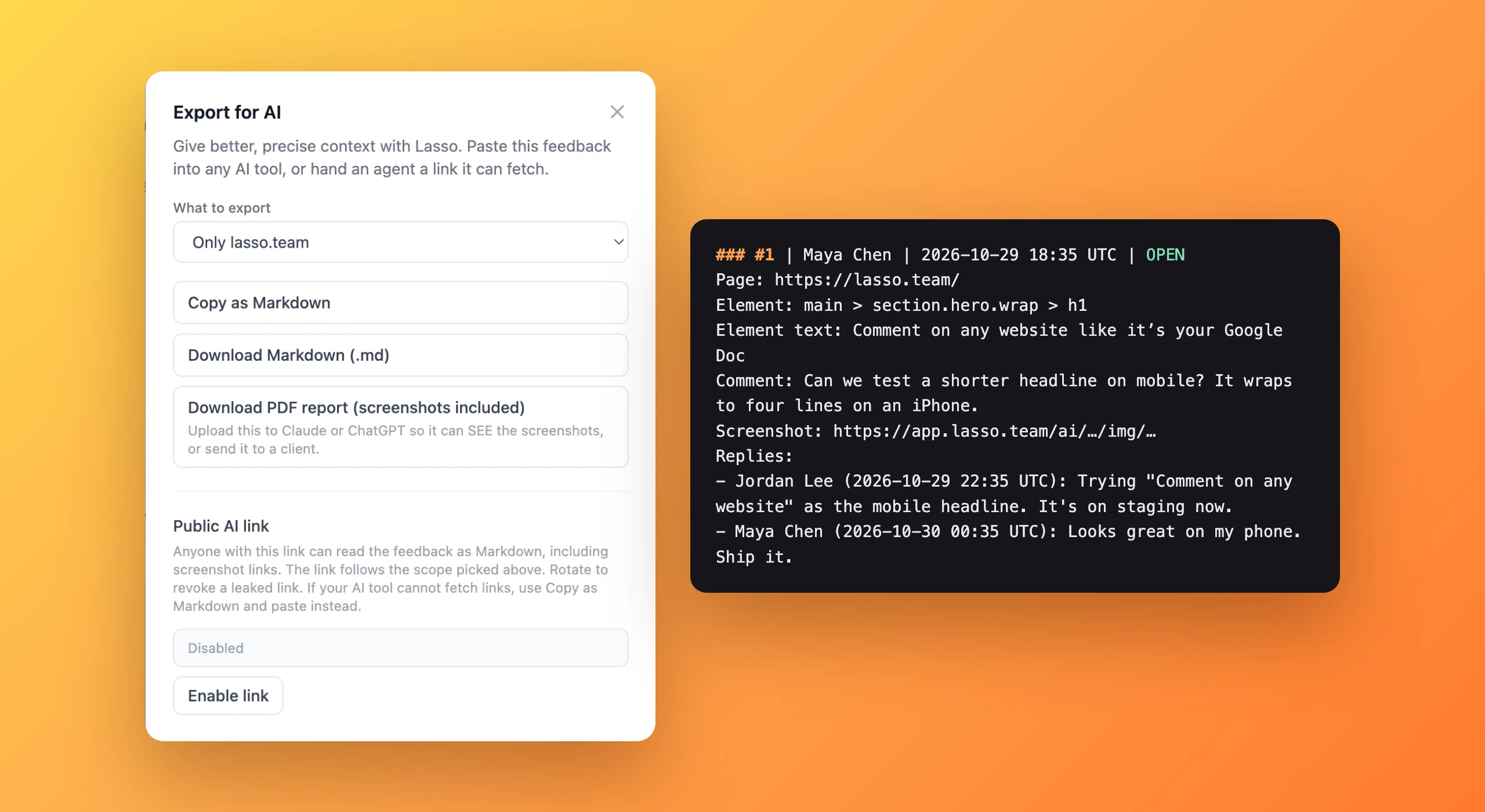
- Export. Open the collection in Lasso and click Export for AI. Choose the whole collection or one site.
- Hand it over. Copy the Markdown, download the PDF, or turn on the private AI link.
Which format to use
| Format | Best for | How |
|---|---|---|
| Markdown | Cursor, Claude Code, Codex, ChatGPT, Claude | Copy and paste, or upload the file |
| PDF with screenshots | Chat apps that read images but won't open links, and people | Download and upload |
| Private AI link | Agents that can fetch a URL | Turn it on, paste the link, turn it off when done |
What the Markdown looks like
The file opens with a short guide that tells the AI how to read it. Then each comment looks something like this.
### #1 | maya | 2026-10-30 14:12 UTC | OPEN
Page: https://staging.acme.com/pricing
Element: section.plans > div.plan-card:nth-child(2) > a.btn
Element text: Start free trial
Comment: Say "Start your 14-day trial" and use the primary button style.
Screenshot: https://app.lasso.team/ai/.../img/...
Replies:
- dev: Primary style is the orange gradient one in the hero.
That's everything the AI needs to find the element and make the change, and the reply tells it which style "primary" means.
Prompts that work
For code fixes in Cursor or Claude Code.
Work through every OPEN item in this Lasso export. Use the Element and
Element text lines to find each element. Treat RESOLVED items as context
only, follow the latest reply where it changes the request, and tell me
anything you couldn't find.
For a review summary in ChatGPT or Claude.
Summarize this Lasso export for the team. Group the OPEN items by page,
mark which look quick and which need a decision, and list any items where
the replies disagree.
For research. The same export works when the notes are on competitor pages. We put the prompts we use for battlecards, positioning and copy in turning competitor research into a battlecard.
Getting better results
- One request per comment. "Fix spacing and change the copy" becomes two tasks the AI can tick off separately.
- Say what you want, not only what's wrong. "Too long" leaves the AI guessing. "Cut to one sentence" doesn't.
- Resolve before you export. Anything already fixed should be resolved, so the AI reads it as background rather than redoing it.
- Scope the export. If a collection covers several sites, export one at a time so the AI stays focused.
- Ask it to report what it couldn't find. Pages change. A list of misses is more useful than a silent guess.
When it doesn't go to plan
The AI changed the wrong element. The selector may have changed since you commented. Ask it to match on the Element text line instead, which is usually more stable.
It ignored the screenshots. Many tools don't open links in pasted text. Use the PDF, which embeds the images, or the private link for agents that fetch URLs.
It redid something already fixed. That item probably wasn't resolved. Resolve it in Lasso and export again.
The page is behind a login. That's fine. The AI doesn't need to visit the page, because the export carries the element, text and screenshot from your own signed-in view.
Export for AI is on Lasso's free plan, including Markdown, PDF and the private link. See how it fits with coding agents and research on the Export for AI page.
Questions people ask
Can ChatGPT see a website if I paste the link?
Sometimes it can fetch the page's text, but it doesn't see the layout, your logged-in view, or the specific thing you mean. Giving it your notes with the element and a screenshot works far better.
What format is best for giving feedback to an AI?
Markdown for text-first tools and coding agents like Cursor and Claude Code, and a PDF with screenshots embedded for chat apps that read images but won't open links.
Is Lasso's Export for AI free?
Yes. The Markdown export, the PDF report and the private AI link are all on the free plan.
Can I export just one site from a collection?
Yes. Export for AI lets you scope the export to a single site, which keeps the AI focused when a collection covers several.
Will the AI act on feedback that's already been fixed?
Not if you resolve it first. The export marks every item as OPEN or RESOLVED and tells the AI to treat resolved items as background only.
Is my feedback shared publicly?
No. Exports go only where you paste or upload them. The private AI link is off until you turn it on, uses an unguessable address, and stops working the moment you turn it off.