
Add comments on any website, then send them to your AI agent
Parry Gill · Nov 6, 2026 · 4 min read
Say you open your own pricing page and spot three things. Hero copy's too long. The monthly/yearly toggle is in a weird place. And on mobile, one button wraps onto two lines for no reason. Cursor or Claude Code could fix all of it before your coffee cools. Explaining it to them is what eats the time.
So you write it out. "On the pricing page, near the top, the toggle thing, move it closer to the plans." The agent guesses, gets it half right, and you write it out again. Honestly it's giving directions over the phone to a friend who can't see the street signs.
What I do now is point at the page instead. Three steps.
Step one. Comment right on the page
Press Alt+C on the page. Click the thing you mean (or drag a box if it's a whole area) and type what's wrong. That's a comment. Lasso pins it to that exact spot and takes a screenshot of it for you.
Do that for each thing you'd normally describe in a message. Keep going until you run out of complaints. That's honestly most of a website audit, page after page. Everything lands in one collection, so the round of website feedback lives in one list and not in five chats and a DM.
If a teammate is reviewing too, share the collection. Their comments land in the same place, with their name on them, and you can reply under each one before anything goes to the agent.
Step two. Export for AI
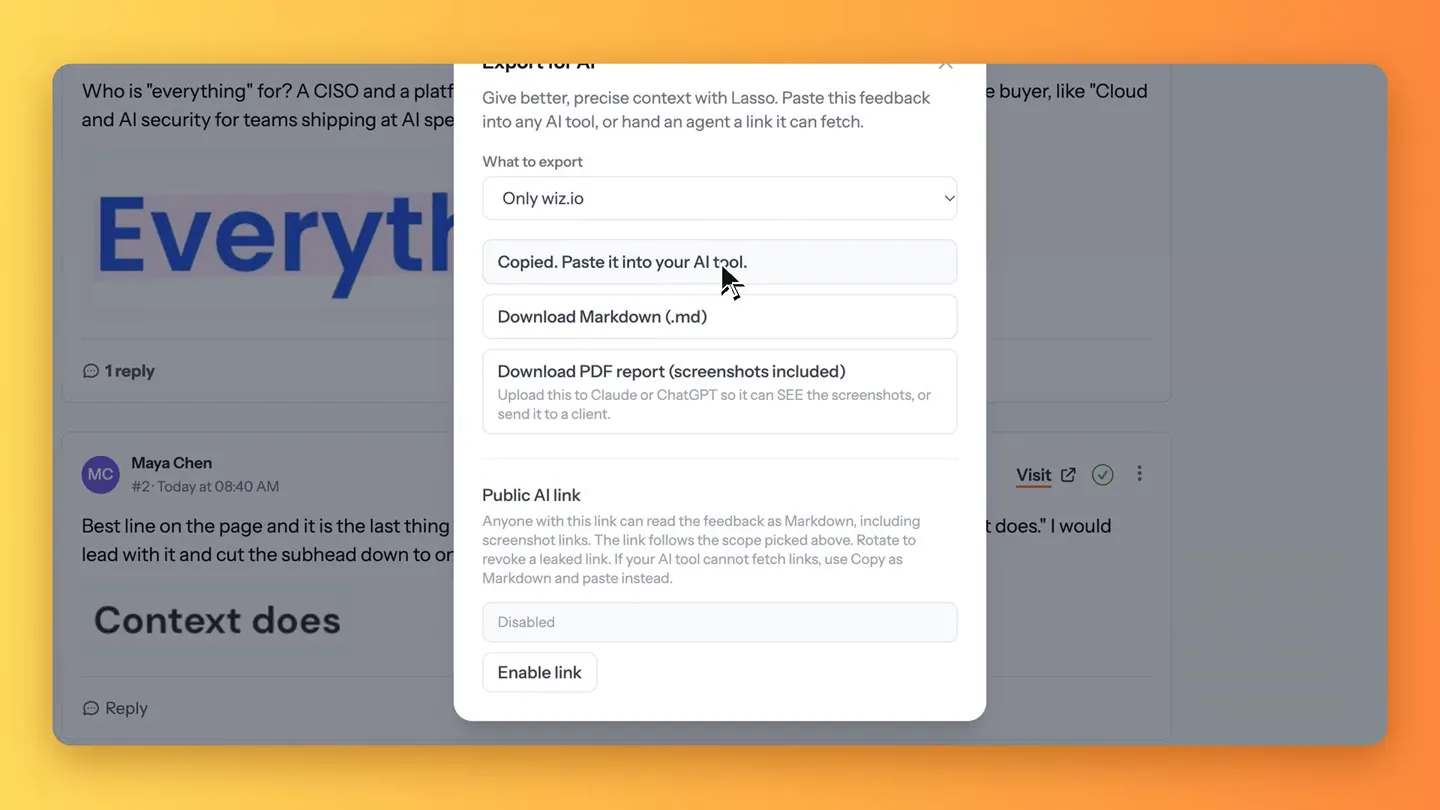
Now head to the collection in the Lasso web app and hit Export for AI. Whole collection or just one site, your call. Then pick a format.
- Copy as Markdown if you're about to paste it into a chat.
- Download Markdown gives you a file, which suits Cursor and Claude Code.
- Download PDF keeps every screenshot inside, for tools that read images.
Each comment comes out with its page, the element (its selector and the words on it), what you wrote, the screenshot and any replies. That's the context layer your agent is missing when all it gets is a paragraph from you.
Step three. Hand it over
Paste it in, then be specific. I use something like this.
Fix the open comments in this file. For each one, find the element
by its selector and text, make the change, and tell me what you did.
Skip anything marked resolved.
The agent knows which page, which element, what it looked like and what you want. There's not much left for it to guess, which is the whole point.
Once it's done, open the page again, check each fix next to its comment, and resolve the ones that landed. Whatever's still open goes into the next export.
A word on privacy
People ask about privacy a lot, fair enough. Lasso lives in your browser. You don't paste a script into your site and your visitors never load anything from us. A new collection is private until you share it with someone. And the screenshot is just the bit you picked, not your entire screen with your inbox open in the next tab.
The export only leaves Lasso when you copy or download it. There's also a public AI link that an agent can read by itself. It's off until you switch it on, and you can rotate it or turn it off again whenever you like.
Why this is nicer
The annotation work you'd do anyway, pointing at things and saying what's wrong, becomes the brief. You don't write it twice. The agent gets the exact spot instead of your best description of it, so fewer rounds go back and forth. And when someone asks in a month why the toggle moved, the comment is still sitting on the page with the screenshot of how it looked before.
It works the same for research, by the way. Annotate a competitor's pricing page and ask ChatGPT for a battlecard. Here are the prompts we use.
Export for AI is on the free plan. Grab Lasso, drop three comments on whatever page is bugging you, and send them to your agent. You'll know pretty fast if it's your thing.